YEAR 11 DIGITAL TECHNOLOGY
  • Computer Literacy
    • Basics
    • File Types
    • Compression
  • Animation
    • Adobe Illustrator >
      • Intro to Illustrator
      • Review of Illustrator Techniques
      • Illustrator - The Third
      • Advanced Illustrator
    • Adobe After Effects >
      • Basic Animation
      • Export to Youtube
      • Rigging
      • Animation Project
    • Project Documentation >
      • Purpose, Potential Users, Requirement and Specifications
      • Testing and Refinement
    • AS92005 - Develop a Digital technologies outcome
  • HTML/CSS Basics
    • HTML
    • CSS
    • Classes
  • Programming
    • Learn Basics - Variables and Prompts
    • If Statements
    • For Loops & Basic Arrays
    • While Loops & Functions
    • Robustness
    • Debugging
    • Skills Test
    • Testing and Documentation
    • Programming Assessment
  • HCI
    • AS92006 - HCI Exam
    • Introduction-Describe-Identify
    • Neilson's Heuristics
    • mātāpono Māori
    • Explaining Principles
    • Compare/Improvements
    • Practice Practice Practice
  • Data
    • Learn Excel
    • Learn Excel (Part Deux)
    • Practice Assessment
    • Practice Assessment 2 - police
    • Assessment
  • Freyberg Digital

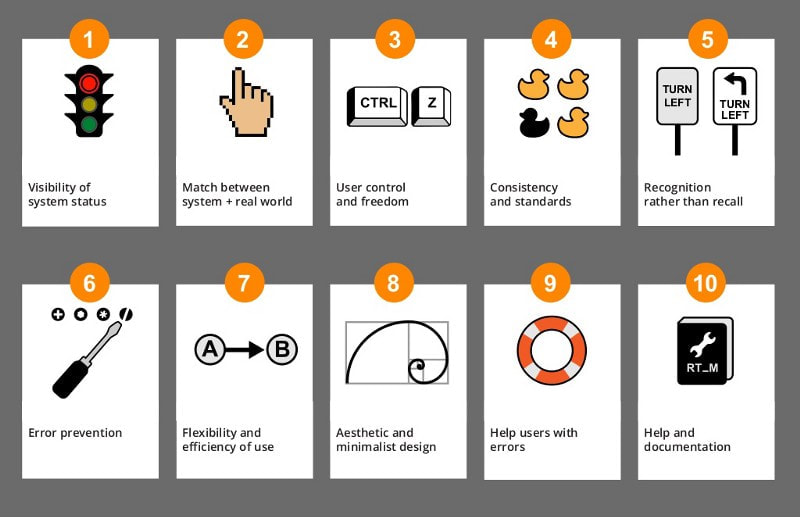
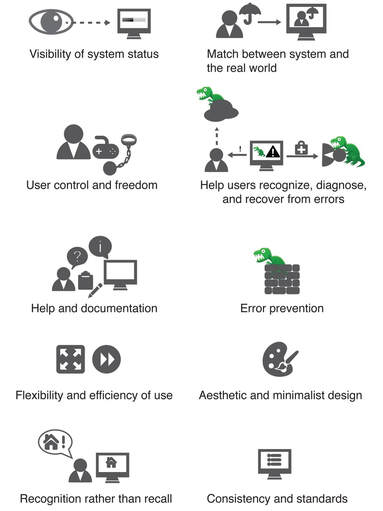
Neilson's Usability Heuristics.


​Jakob Nielsen, a renowned usability consultant and co-founder of the Nielsen Norman Group, introduced the usability heuristics in 1994. These heuristics are a set of general principles for user interface design that have since become widely used in the field of human-computer interaction and usability engineering. They provide guidelines for designing more usable and user-friendly interfaces.


Generated by Chat GPT.

These usability heuristics are widely accepted as rules to make your interfaces easier.

One day you will be as cool as Nielson --------->
Picture

Neilson's 10 Usability Heuristics

Picture
Picture

Activity: Research One Usability Heuristic

Group Activity: Research a Usability Heuristic.
Partner up with at least 2-3 other people, we need 9 groups in total
You will be assigned a usability heuristic by your teacher.
Complete these tasks in your one note.
  1. What is the name of your groups Heuristic?
  2. Describe the Heuristic
  3. Give an example of this heuristic from a website of your choice
  4. Take a screenshot of this heuristic.
Individual Activity: Take notes as other groups give their examples.
One member from each team will need to present the heuristic. 
Your teacher will use your OneNote on the projector to help support your presentation.
If you are not presenting you need to take notes on OneNote.
Picture

Identify and describe the usability heuristics

Task: ​Using the video on the right , identify and describe some usability heuristics.

1.) Skim Watch the video on the right (you can skip parts).
2.) Identify a usability heuristic that is in use
3.) Describe how TradeMe uses them with screen shots
4.) Do this all in your One Note.
5.) Repeat this 4 times

​


Your own website

Task: Take screenshots from your chosen website and identify the 10 usability heuristics

Powered by Create your own unique website with customizable templates.
  • Computer Literacy
    • Basics
    • File Types
    • Compression
  • Animation
    • Adobe Illustrator >
      • Intro to Illustrator
      • Review of Illustrator Techniques
      • Illustrator - The Third
      • Advanced Illustrator
    • Adobe After Effects >
      • Basic Animation
      • Export to Youtube
      • Rigging
      • Animation Project
    • Project Documentation >
      • Purpose, Potential Users, Requirement and Specifications
      • Testing and Refinement
    • AS92005 - Develop a Digital technologies outcome
  • HTML/CSS Basics
    • HTML
    • CSS
    • Classes
  • Programming
    • Learn Basics - Variables and Prompts
    • If Statements
    • For Loops & Basic Arrays
    • While Loops & Functions
    • Robustness
    • Debugging
    • Skills Test
    • Testing and Documentation
    • Programming Assessment
  • HCI
    • AS92006 - HCI Exam
    • Introduction-Describe-Identify
    • Neilson's Heuristics
    • mātāpono Māori
    • Explaining Principles
    • Compare/Improvements
    • Practice Practice Practice
  • Data
    • Learn Excel
    • Learn Excel (Part Deux)
    • Practice Assessment
    • Practice Assessment 2 - police
    • Assessment
  • Freyberg Digital