What we know as of the 12th of March
|
Throughout the course of the year we are given hints about the exam and what sort of things we should focus on.
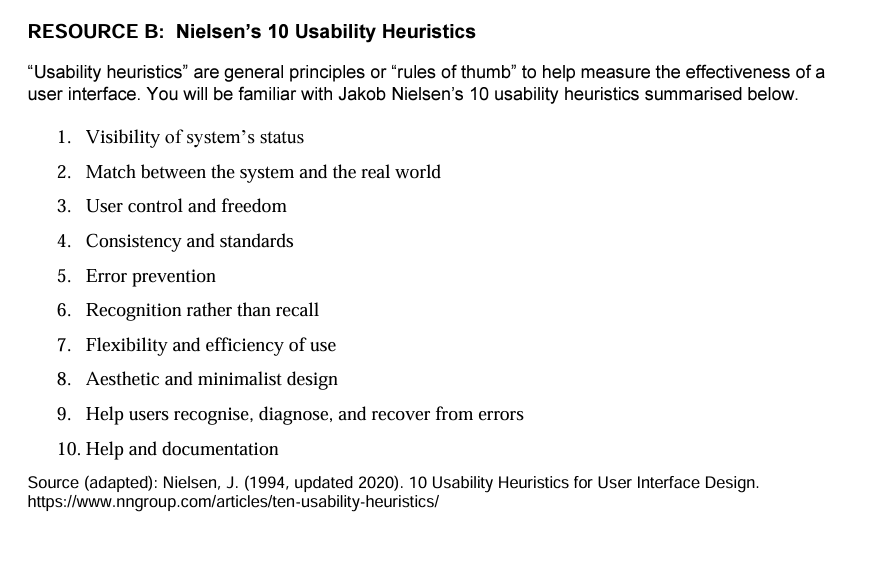
Here is the information from the NCEA website: Possible contexts Students should have the opportunity to explore a range of interfaces built for different devices. Websites or smartphone apps for e-commerce sites or streaming services offer a good starting point. Websites for businesses in New Zealand will give better options for students. It is possible that our interface will be TVNZ and/or ThreeNow. It is possible you will be given an interface on a Phone. Here is the information we have from the specifications: Questions will be in short or extended answer format. Resources will be provided within the examination. For 2024, examples of usability principles will be drawn from:
Candidates will study an interface of their choice before the assessment. In the 2023 exam you were allowed to use 5 screenshots from you studied interface. With this in mind the only thing we can do is practice..... |

|
Practice Practice Practice.
This page is designed as a practice for the exam, try to complete this page without referring to any of your notes.
Spend some time now looking at your notes and only looking at this page and your new one note page.
Task: Spend 30 minutes reading through your notes, try to remember the following for this page:
1.) What is the name and purpose of the website you studied
2.) What are some heuristics your website does well or poorly
3.) What recommendations do you have to improve your website in terms of usability heuristics.
Task: Take 5 screenshots
Take 5 screenshots showing how your chosen interface uses heuristics, think about the 3 points above.
Put this in a word document.
Once you are done, try not to look at any other page except your one note, screenshots or this page.
Spend some time now looking at your notes and only looking at this page and your new one note page.
Task: Spend 30 minutes reading through your notes, try to remember the following for this page:
1.) What is the name and purpose of the website you studied
2.) What are some heuristics your website does well or poorly
3.) What recommendations do you have to improve your website in terms of usability heuristics.
Task: Take 5 screenshots
Take 5 screenshots showing how your chosen interface uses heuristics, think about the 3 points above.
Put this in a word document.
Once you are done, try not to look at any other page except your one note, screenshots or this page.
Resources
Questions
Task: Answer these questions in your OneNote
Section A
i. State the name of your interface
ii. Briefly describe the purpose of your interface. What does the user want to achieve while they are using it?
i. State the name of your interface
ii. Briefly describe the purpose of your interface. What does the user want to achieve while they are using it?
Section B
i. Pick a moment from the video and with screenshot evidence explain how usability heuristics are used. Describe the heuristic
Do this 3 times
ii. Evaluate how successfully usability heuristics have been applied in each moment.
Do this 3 times
i. Pick a moment from the video and with screenshot evidence explain how usability heuristics are used. Describe the heuristic
Do this 3 times
ii. Evaluate how successfully usability heuristics have been applied in each moment.
Do this 3 times
Section C
i. Compare Netflix interface with your interface. Discuss the similarities and differences between the interfaces, and identify which addresses usability heuristics best, and why.
i. Compare Netflix interface with your interface. Discuss the similarities and differences between the interfaces, and identify which addresses usability heuristics best, and why.
Section D
i. Recommend improvements that could be made to your interface by applying usability heuristics. Explain how these will improve the usability of the website in terms of the user's experience.
ii. Recommend improvements that could be made to Netflix by applying usability heuristics. Explain how these will improve the usability of the website in terms of the user's experience.
i. Recommend improvements that could be made to your interface by applying usability heuristics. Explain how these will improve the usability of the website in terms of the user's experience.
ii. Recommend improvements that could be made to Netflix by applying usability heuristics. Explain how these will improve the usability of the website in terms of the user's experience.
